Share Your Local Changes With a Team Member without Pushing a Branch
A branch is not always the fastest way to share work. When your changes are local, unfinished, or too small for a pull request, a git patch is a clean handoff: one file, reviewable diff, no remote branch required. Many developers still copy changed files manually or zip the full codebase just to share local changes, but that is noisy, error-prone, time-consuming, and hard to review. LithiumGit makes the same flow visual with import and export actions.
When a Patch Is the Smart Move
Do not use patches as a replacement for pull requests. Use them when you need a lightweight way to transfer a local diff before the work becomes permanent team history. A patch is usually cleaner than sending loose files because it preserves the exact diff your teammate needs to apply.
Git CLI: Export and Apply Local Changes
# stage the changes
git add .

# Export only staged changes to a patch file
# --binary includes binary files as well (png, jpg, pdf, etc.)
git diff --cached --binary > changes.patch

# Export unstaged changes only
git diff --binary > changes.patch

# Export both staged and unstaged changes (tracked files only)
git diff HEAD --binary > changes.patch
# Apply the patch to the working tree
git apply --binary changes.patch
LithiumGit: Export Changes Visually
In LithiumGit, open the import/export changes action, choose the files you want to share, then save them as a patch file. Your teammate can import the same file into their working copy.
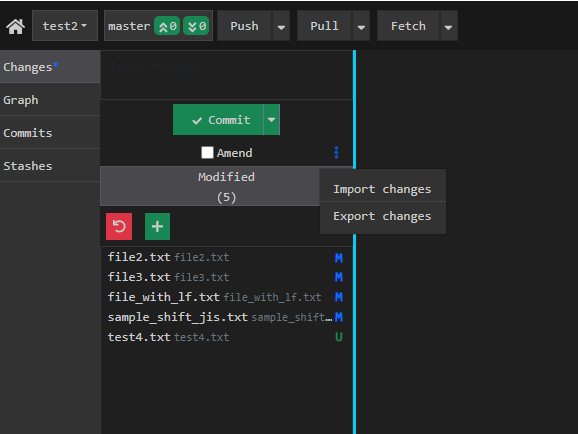
Open Import/Export Changes
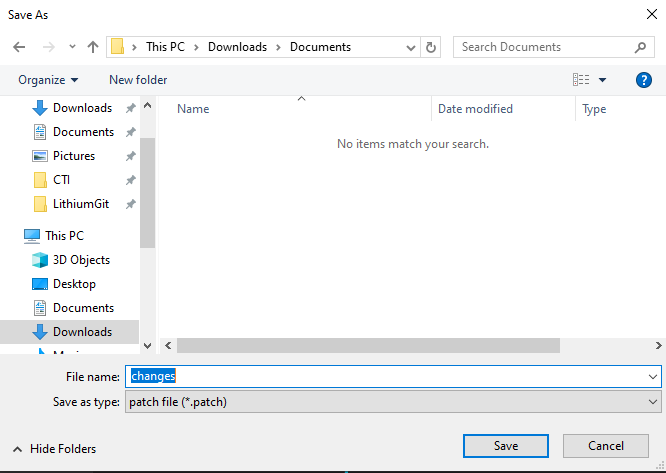
Save selected changes as a patch and send it to your teammate
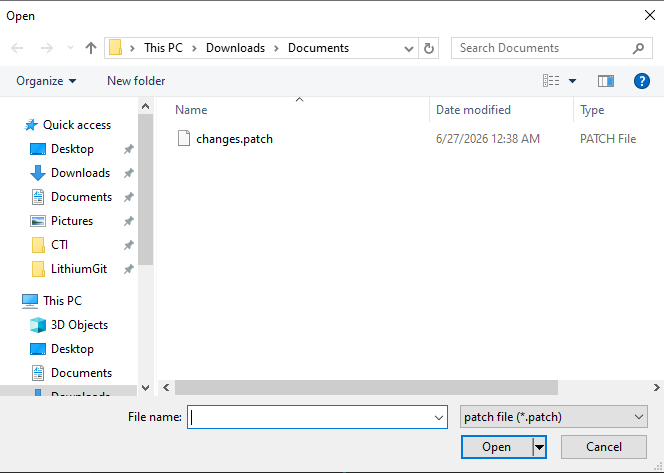
Teammate selects the patch file and imports it
Patch vs Branch: Quick Decision
| Use Case | Best Choice | Why |
|---|---|---|
| Quick local review | Patch | No remote branch noise |
| Production-ready feature | Branch + PR | Review, CI, and history |
| Debugging a teammate issue | Patch | Fast transfer of the exact diff |
Frequently Asked Questions
- How do I share local changes without committing?
- Run git diff > changes.patch, send the patch file, and ask your teammate to run git apply changes.patch.
- Does a patch include untracked files?
- Not by default. Add the file to Git first with git add -N path/to/file, or create a separate patch after staging it. But LithiumGit includes untracked files as well while exporting.
- Should I use git patch or push a branch?
- Use a patch for temporary, local, or experimental work. Push a branch when the work needs normal review, CI, and long-term history.